
Experience Navicat AI: Get 20% off your new perpetual license today.

Buy Now
More info
Navicat UI > Learn more
Windows
macOS
Linux

Navicat UI

Navicat features a task-focused UI that provides a clear, guided route through your entire workflow. By eliminating clutter and friction, it keeps you in a seamless flow state - allowing you to navigate, query, and manage your data effortlessly.

Native Design

Built specifically for Windows, macOS, and Linux. Experience lightning-fast responsiveness and system-level integration that feels like a natural extension of your OS.
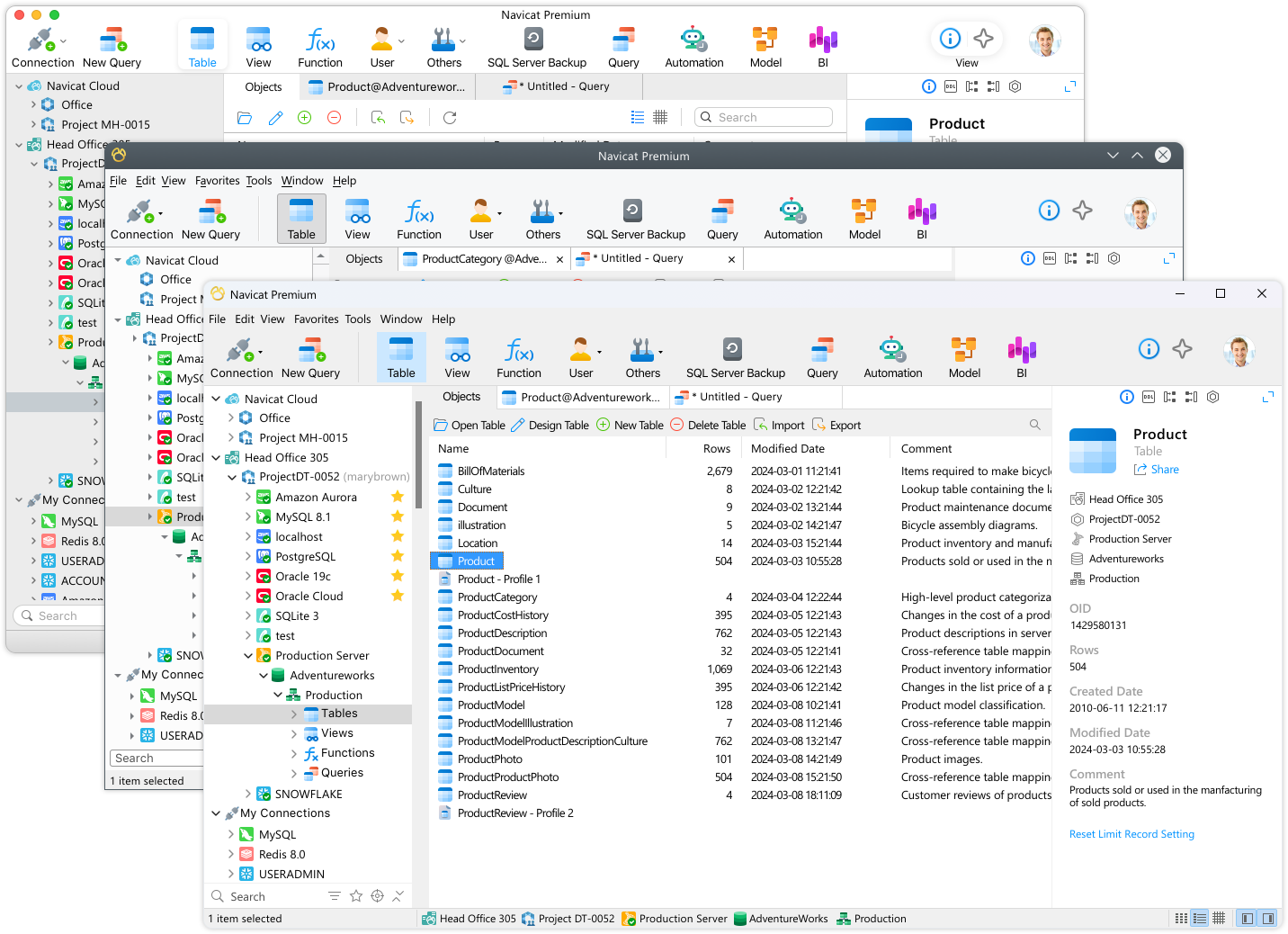
Connection Coloring

Color-code your connections to instantly identify your database environment at a glance. Your chosen color carries over to every object beneath that connection in the navigation tree and also directly onto open object tabs, so you always know exactly which system you are modifying.
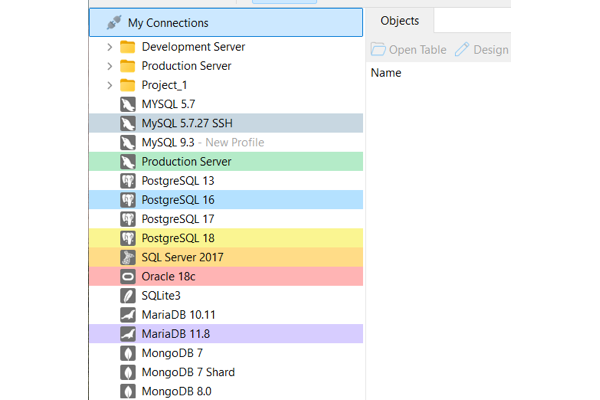
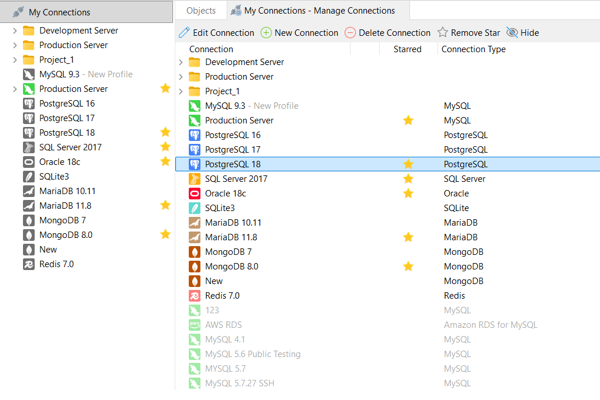
Add Star for Connections

Star your most important connections to find them in a flash. This allows you to quickly focus your navigation pane on your high-priority environments, making them incredibly easy to find.
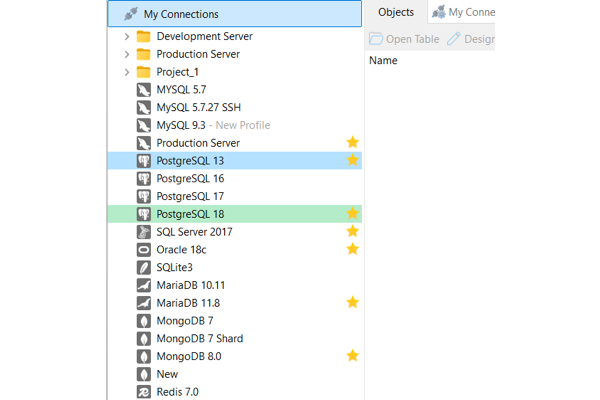
Add to Favorites

Add your frequently used objects and features - from database objects to tools like Model, BI, or Automation - to your Favorites list. Bypass deep navigation tree and jump straight to work with a single click.
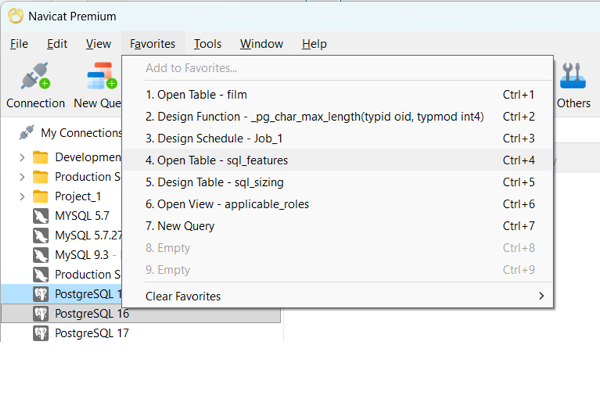
Add your frequently used objects and features - from database objects to tools like Data Editor, Automation - to your Favorites list. Bypass deep navigation tree and jump straight to work with a single click.

Virtual Grouping

Group your connections and objects into logical categories without changing their physical database structures. This virtual organization ensures your actual database objects are safely preserved exactly where they are while giving you a highly structured, easy-to-navigate workspace.
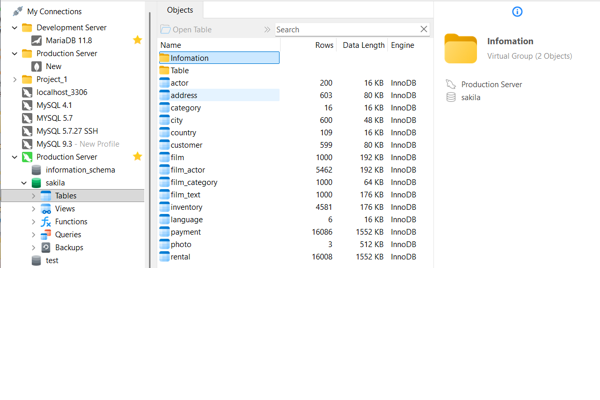
Hide Unused Connections

Keep your navigation pane clean and distraction-free by hiding connections you don't need for your immediate tasks, ensuring you only see what matters right now.
Search & Filter Tools

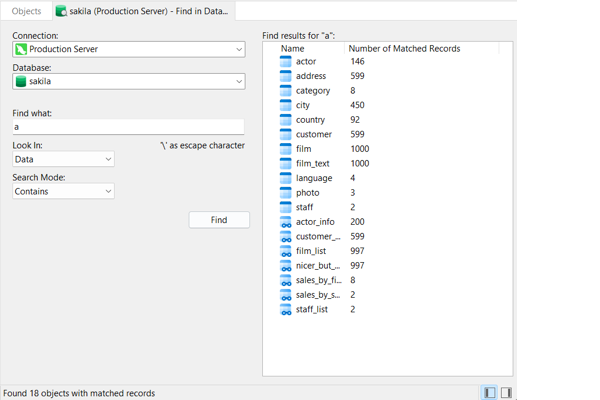
Find in Database / Schema

Deep-search across any targeted connection, database, or schema to instantly locate specific data records or structural definitions. Customize your search with precision matching modes - like Contains, Whole Word, Prefix, or Regular Expressions - with optional case-insensitivity to search exactly what you need.

Results are clearly highlighted in red, and a quick double-click on any result opens the corresponding object tab immediately for an unbroken workflow.
Filler Bar in Navigation Pane

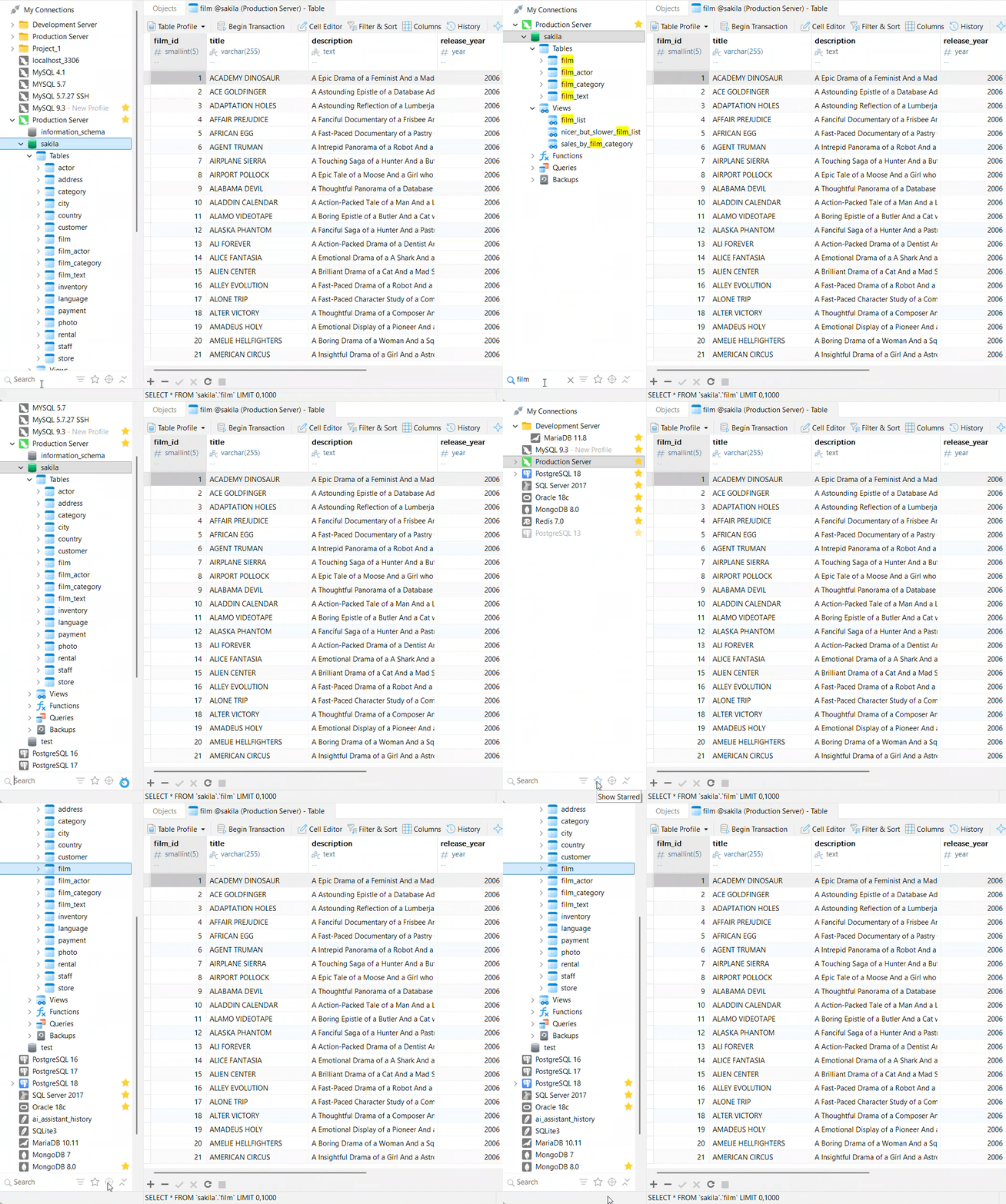
Instantly isolate connections, groups, and database objects right within your navigation pane. As you type into the search box, your view dynamically filters while matching categories automatically expand to reveal your results.

Connection Filter: Filter your view by connection types, database vendors or active objects.

Show Starred: Toggle with a single click to display only your high-priority, starred connections.

Locate Active Tab's Object: Never lose your place. Instantly highlight and jump to the exact database object you are currently editing in your active tab.
Contextual Search Filter

Find what you need instantly across every corner of Navicat without breaking your focus. Search filters are built right into your workspace views:

Direct Tree Search: Click anywhere in a tree view and start typing to jump directly to matching items.

In-Tab Filtering: Use the inline search box to dynamically narrow down items on screen.
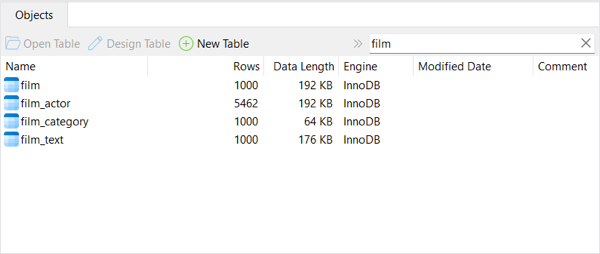
Focus Mode

Reduce distractions and set clear boundaries for your work. Focus Mode removes everything from your screen except the active form or editor you are working on and enters full-screen mode, allowing you to dedicate your complete attention to the task at hand.
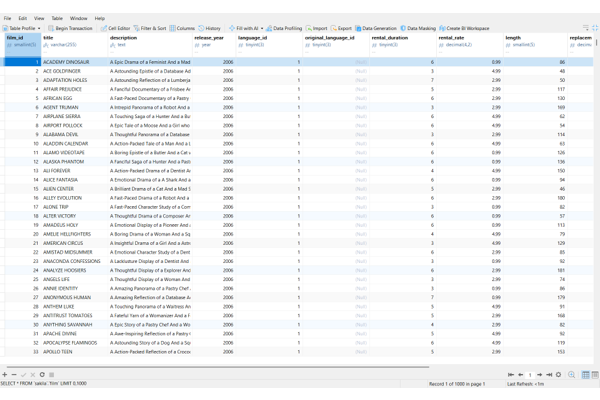
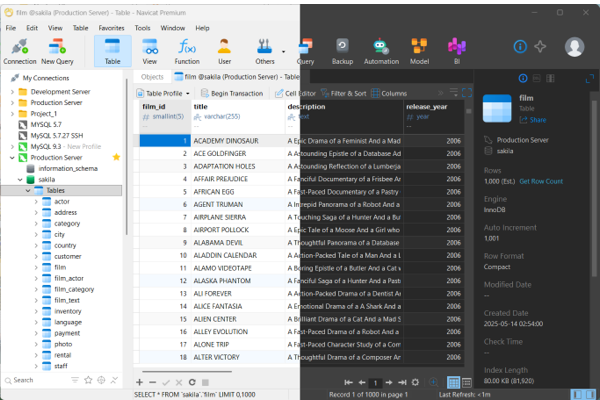
Color Themes

Choose the look that best fits your environment and working habits. Switch to the beautifully polished Dark Theme - which applies a darker color palette across all windows, views, menus, and controls to reduce eye strain during long hours - or stick with the classic, high-contrast Light Theme for a clean, traditional workspace.
Hot Keys

Work at the speed of thought with keyboard shortcuts for nearly every feature. Use our guide to quickly locate the exact shortcuts you need to streamline your tasks and minimize mouse clicks.

View the Comprehensive Hot KeysGuide

*Note: All screenshots are taken from Navicat Premium
Supported Cloud Providers and Vendors
Amazon AWS
Microsoft
Amazon RDS for MariaDB
Microsoft Azure Database for MariaDB
System Requirements
Windows
macOS
Linux
Windows 8
Windows 8.1
Windows 10
Windows 11
Windows Server 2012
Windows Server 2012 R2
Windows Server 2016
Windows Server 2019
Windows Server 2022
Windows Server 2025
macOS 14 Sonoma
macOS 15 Sequoia
macOS 26 Tahoe
macOS 27 Golden Gate
Flatpak
Flatpak supported distributions.
AppImage (x86_64)
Debian 10, Debian 11, Debian 12, Debian 13, Ubuntu 20.04, Ubuntu 22.04, Ubuntu 24.04, Ubuntu 26.04, Fedora 44, Linux Mint 20, Linux Mint 21, Linux Mint 22, Deepin 20, Deepin 23, Deepin 25, KylinOS Desktop 10, Pop!_OS 20.04, Pop!_OS 22.04
AppImage (aarch64)
Debian 11, Debian 12, Debian 13, Ubuntu 22.04, Ubuntu 24.04, Ubuntu 26.04, Fedora 44, Linux Mint 20, Linux Mint 21, Linux Mint 22, Deepin 23, Deepin 25, KylinOS Desktop 10, Pop!_OS 20.04, Pop!_OS 22.04

Our Customers

  • “Having all of my database environments accessible from one tool has greatly streamlined my work. ”

    Caleb Elrod

    IT Software Engineer
    Michelin North America, Inc.

    “Navicat is fabulous, fast, easy to use. It makes working with databases fun.

    It's much better than TOAD.

    My favourite features of Navicat are Backup, import/export, basic database functionality, including browsing tables, connections management, toolbar, subdivision of functions, user management, queries, performance.”

    Jan Theodore Galkowski

    MIT (Massachusetts Institute of Technology)

    “I have tried many other fine programs, but Navicat is by far the best. Ease of use and the list of features make it my choice for MySQL administration.”

    “Customer support for Navicat is very good. My email questions were quickly and accurately answered.”

    Jeff Tucker

    Director of Engineering
    Emmis Communications (NASDAQ: EMMS)

  • “Navicat save our time to manage our databases. The backup features and how simple it is to use cannot be compared. I recommend PremiumSoft Navicat to everyone I know. Keep up the great work guys!!!”

    Orlando Piedrahita

    System Engineer
    World Fuel Services Corporation (NYSE:INT)

    “I really like the new GUI in Navicat.

    The Speed of Navicat is very fast and its Interface is very nice. Stability has also been strengthened.”

    Karsten Torp Rasmussen

    Senior Consultant
    KPMG Advisory

    “It is an excellent tool that allows me to design all aspects of a MySQL DB's.

    The real values of Navicat are:
    - editing of tables in an Excel type fashion
    - import/export from/to many function
    - migration of DB's from one server to another”

    Proenen, Hanns

    General Electric (Capital Solutions GmbH & Co.KG)

  • “The main problem Navicat is solving for me is creating the queries in a fast.

    The query builder helps tremendously with that - and I haven’t seen any other tool that helps me create my queries for MySql. Navicat is pretty much self-explanatory.”

    Ed Garcia

    Yahoo! (NASDAQ: YHOO)

    “Very professional product. Easy to use. Nice GUI.

    We use Navicat to produce custom reports based on complex queries.”

    Jeff Gellner

    CISSP JPMorgan Chase & Co.

    “These are the features that we like :

    - It allows us to transfer file between two servers
    - It allows us to synchronize between two databases in a single and bidirectional directions
    - It allows us to build queries faster with query builder
    - It allows us import and export databases into different file formats
    It has a good online visual demo. The help file is also well organized and easy to follow.”

    Mark Horn

    Intel Corporation (Nasdaq:INTC)

  • “I worked since 2005 with this database tool. As interface to our MySQL severs I developed with Navicat many queries. The tables are partial very big (more than 50 Million records).

    With my favourite tool Navicat I create the queries fast and effective and with nightly schedules I get the query results on early morning. Also, your support worked quick and professional and now everything is alright.”

    Volker Plank

    Porsche Leipzig GmbH

    “Navicat is the only program I have seen that works this well on the Mac. Able to export and import easily. Very easy to use. Lightening fast. Scheduling, back-ups, Queries are all very easy to use. This does a lot more than what I expected.

    Didn't really need the documentation. Navicat was so well designed and user-friendly that I just started using it.”

    Scott Lozier

    Administrative Coordinator
    Office for the Arts at Harvard
    Harvard University

    “Navicat integrates managing MySQL database in a very user friendly interface. Updating without a UI from search table results. The database conversion from older formats to MySQL is seamless.

    It’s one tool solution for Designing, Managing and Automating MySQL. Transferring data from one server to other is very convenient. Backup and restoration DB in 1 easy step”

    Sandeep.Bishnoi

    Alcatel

  • “The clear and powerful GUI was leagues ahead of other solutions. Of particular importance to this choosing this solution was the strong CSV upload and export tools. It also proved really useful to be able to store queries and share them between users. The query builder was a big plus too.

    We’re really happy with Navicat and only wish that we’d chosen the product sooner.”

    Matt Fenby Taylor

    SonyBMG Music Entertainment Ltd.

    “Navicat provided a quick and easy means of importing many different spreadsheets into database tables and an easy way to update those tables. Even after weeks of having a standard process of managing the database we utilize Navicat's import mechanism to handle unique data updates coming from our customer. Without this ability we would be weeks behind schedule.”

    James Hoover

    Hewlett-Packard

    “Navicat allows the building of complex queries, and also management and backup of the database, from a remote windows environment. Navicat is relative ease of use, and flexibility.”

    Dr Richie Gill

    Oxford University

  • “Navicat makes the transfer between software engines extremely simple, better than the other options I explored. Also, the interface for dealing with the database is straightforward, easy to use, and powerful. It is convenient to use to begin to implement SQL code, for example”

    Dr Tim Walsh

    Research Foundation For Mental
    HygieneColumbia University

    “Navicat does an excellent job and as an added bonus, we can use the export function to convert data into other formats for specialized use. The XML conversion was particularly impressive.”

    Donald J. Varney

    Systems Developer III
    State of Vermont - Department of Banking,
    Insurance, Securities & Health Care Administration

    “Using Navicat, it is essentially a breeze to manage MySQL. It is going to save us tons of time and time is money!

    Navicat is easy to use because the menus and tools bars are very clearly label and designed. We have never had a problem with the software crashing or corrupting data.

    A GUI interface that provides complete functionality for configuring and using MySQL. What might take hours with the command line, Navicat can accomplish in seconds.”

    Dave Garcia

    Washington State University Student Publications

  • “Navicat is very important for us to manage our MySQL databases. It is quite easy to use and has very powerful features as, for instance, the query builder. The features we use most are the backup and queries, also in relation with the scheduler. A nice-to-have feature would be a mailer function where, for instance, a result of a query could be sent to a specific user.”

    Gilbert Schroeder

    Goodyear Luxembourg Tires SA.

    “I use Navicat to help with entry. There are approximately 2300 rows, and approx 123 columns for each row of data, it is used daily, I am currently trying to convince the office the benefits of using the MySQL/Navicat combination over other implementations.”

    “I enjoy your product very much, I purchased it, and Navicat increase productivity 1000 fold.”

    Jonathan Mark Petrush

    United States Marine Corps

    “I have used Navicat almost daily, and have recommended it to many others in my field. It is by far the best product of its kind on the market. And the price is much lower than I would have expected for such a robust feature rich product.”

    Jeff Austin

    Division of Biological Sciences, Office of the Dean
    University of California, Davis

  • “Most of our data is in Microsoft Access or MS SQL Server. With Navicat importing and exporting data from and to those formats is very easy and requires virtually no additional training. Moving to new technology is often intimidating to people but once I demonstrated Navicat to our staff they were pleasantly surprised. Navicat truly makes it easier to administer mySQL than any other product I have tried.”

    Matthew Ryan

    NCDA&CS Website Manager
    North Carolina Department of Agriculture & Consumer Services

    “Navicat is an excellent product and I have yet to look at the documentation!

    Navicat 's strengths are (obviously) its ease of setup and use. I've dealt with software since my junior year in high school (1981) and know a good product when I see one.”

    Jesse A. Canchola

    Principal Statistician Director, Data Analytic & Survey Services
    University of California at San Francisco

    “These are the strengths of Navicat --
    - Easy to manage multiple connections
    - Access to MySQL databases across the WAN is very quick and efficient compared to other products
    - Designing and updating table structures is much easier than comparable products
    - Provides an "easy to use" import and export wizard
    - User administration interface is excellent
    - Reporting tool looks promising”

    Larry Tomsic

    Director - Information Technology
    Alsco, Inc.

  • “Navicat is strong in that function and it has a good query handling. Especially the query builder helps me to save time.

    Navicat has a good user interface and it has perfect multitasking usability.

    It helps very much for our department to generate new reports.”

    Karl Hogerl

    Internet & Database Service Engineer
    TOSHIBA Europe GmbH

    “Your product saved us a lot of time and solved my problem of importing and exporting the data to the tables and even creating Tables, Databases, and Queries. Now I do not have to worry about how to backup the Databases -its just one click now.”

    “It is so easy and simple for the Unix Administrator to connect to the local or remote Database and manage the users with full security. And I would like to thank your technical support staffs. They answered all my question in a short period of time.”

    Firas Najjar

    Web Application Developer at College of Engineering
    Florida State University

    “Navicat really helped easily get my excel data into mysql, and Navicat makes it easy to maintain using a GUI, rather than the line commands, or tedium of phpMyAdmin for multiple edits.

    I am sure Navicat will have more to offer, as my database matures. I can't comment on the documentation, because I've been able to figure out the few things I need to do just from the menus and icons on screen.”

    Charley Weiland

    Stanford University

Awards

20% OFF

*Promotion ends 6 August, 2026 (23:59 ET)